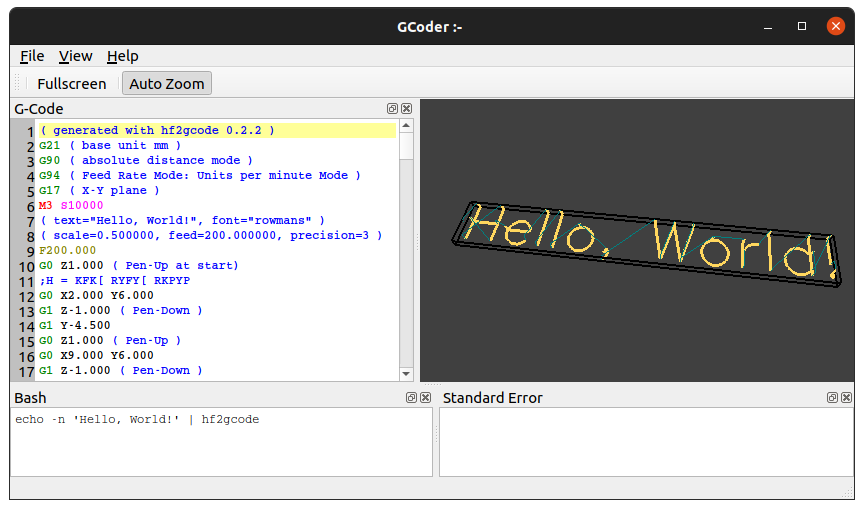
An interactive G-code editing GUI.
Try it in a browser — the WebAssembly
build, deployed to GitHub Pages from main by CI.
qgcoder needs libqgcodeeditor,
a Qt 6 widget for editing G-code. Debian and Ubuntu have a package for it;
everywhere else it has to be built from source into a prefix that
CMAKE_PREFIX_PATH then points at, the way the CI workflows do it.
gh repo clone QGCoder/qgcoder && cd qgcoder
cmake -B build -DCMAKE_BUILD_TYPE=Release -DCMAKE_INSTALL_PREFIX=/usr
cmake --build build -j$(nproc)
./build/qgcoder
or build and install a Ubuntu / Debian package as follows:
gh repo clone QGCoder/qgcoder && cd qgcoder
mk-build-deps -i -s sudo -t "apt --yes --no-install-recommends"
dpkg-buildpackage -b -rfakeroot -us -uc
sudo dpkg -i ../qgcoder*.deb
sudo apt -f installGrab the universal .dmg from the
releases page and drag
qgcoder.app into Applications. It is only ad-hoc signed — there is no
Developer ID certificate in CI — so the first launch needs a right-click →
Open. It runs on macOS 11 (Big Sur) or newer.
CI builds with MinGW-w64: download the windows-mingw64 artifact from the
latest run,
unpack it and run bin/qgcoder.exe. The command pane shells out to bash, so
that one pane does nothing useful there; the editor and the 3D view are fine.
Every push to main is built and deployed by
the wasm workflow, so there is normally no reason
to build this yourself. To do it anyway: each Qt minor release targets one
specific Emscripten version — 6.10 wants 4.0.7, and the pairing for any other
release is named on Qt's Qt for WebAssembly documentation page — so activate
emsdk at that
version, then build both libraries with qt-cmake, which supplies the
Emscripten toolchain file:
QT_WASM=~/Qt/6.10.2/wasm_singlethread  # wherever Qt for WebAssembly lives
PREFIX=$PWD/prefix                     # where libqgcodeeditor lands

git clone https://github.com/QGCoder/libqgcodeeditor
$QT_WASM/bin/qt-cmake -S libqgcodeeditor -B libqgcodeeditor/build \
    -DCMAKE_BUILD_TYPE=Release -DCMAKE_INSTALL_PREFIX=$PREFIX \
    -DBUILD_STATIC_LIB=ON -DBUILD_EXAMPLES=OFF -DBUILD_DESIGNER_PLUGIN=OFF
cmake --build libqgcodeeditor/build && cmake --install libqgcodeeditor/build

gh repo clone QGCoder/qgcoder && cd qgcoder
$QT_WASM/bin/qt-cmake -B build-wasm -DCMAKE_BUILD_TYPE=Release \
    -DCMAKE_FIND_ROOT_PATH=$PREFIX
cmake --build build-wasm
cmake --install build-wasm --prefix $PWD/site
CMAKE_FIND_ROOT_PATH rather than the usual CMAKE_PREFIX_PATH: the
Emscripten toolchain sets CMAKE_FIND_ROOT_PATH_MODE_LIBRARY to ONLY,
which confines find_library() to the find roots, and a prefix path is not
one of them.
site/bin is then a directory a web server can be pointed straight at:
qgcoder.html with the .js, the .wasm and Qt's loader files beside it.
Serve it — file:// will not do, the browser refuses to fetch the .wasm.
A browser has no command line to have named a file on and no file system to
keep one in, so this build opens the doc/demo.ngc sample
compiled into the binary and keeps its scratch file in the one Emscripten
holds in memory. Open and Save As go through the browser's own file
dialogs, and the command pane — which shells out to bash — is compiled out
along with the worker thread the desktop builds interpret on.
– Tested with Ubuntu 24.04 LTS and Ubuntu 26.04 LTS - 

qgcoder is a Qt 6 application. It needs only qt6-base-dev and
libqgcodeeditor-qt6-dev to build: the 3D tool-path view is a plain
QOpenGLWidget driving one small shader, so libQGLViewer, GLEW and GLUT
are no longer required. It draws through the subset shared by the OpenGL 3.3
core profile and OpenGL ES 3.0.
The WebAssembly build is the exception and draws the same geometry with
QPainter instead. QOpenGLWidget does not work in Qt for
WebAssembly: the widget renders into a WebGL context of its own, and the
compositor then has to wrap that context's texture for the one it draws the
window in — which WebGL, having no context sharing, cannot do, and both
contexts are lost the moment it is tried. There is nothing to accelerate here
but coloured line segments, so projecting them on the CPU costs little.
The RS274NGC G-code interpreter is built into qgcoder — there is no separate
rs274 executable to install or point at. See rs274ngc/README.md.
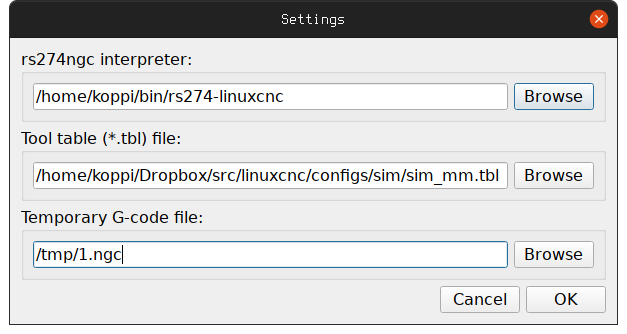
When started first, the desktop builds ask for a scratch G-code filename, and optionally a tool table (leave it empty to use the built-in default), as seen in the following screenshot:
In the 3D view, drag with the left mouse button to orbit, with the right button to
pan and with the middle button (or the wheel) to zoom. Double-click, Home or
Space frames the whole tool path, R returns to the default viewpoint, and
A and G toggle the axes and the grid.
A short YouTube video shows, how you can interact inside qgcoder.
- Jakob Flierl - koppi - main application (
main.cpp,mainwin.*,settings_dlg.*,view.*, packaging) - GPL-2.0
- ArcEye (Mick) - ArcEye - large file handling, settings dialog and menu wiring in
mainwin.*/settings_dlg.*(2016) - GPL-2.0 - Mark Pictor -
g2mG-code-to-mesh interpreter core (canonLine,canonMotion,canonMotionless,helicalMotion,linearMotion,machineStatus,nanotimer,lex_analyzer, 2010) - GPL-2.0-or-later - Anders Wallin - aewallin - modifications to
g2m/g2m.hpp/g2m/g2m.cpp(2011) - GPL-2.0-or-later - Kazuyasu Hamada - modifications to
g2m/g2m.hppand theg2m/gplayer.*G-code player (2015) - GPL-2.0-or-later - NIST and Mark Pictor - the RS274NGC G-code interpreter vendored in
rs274ngc/(2008) - GPL-3.0-or-later