






A very tiny, typed React library for storing state in URL query parameters.
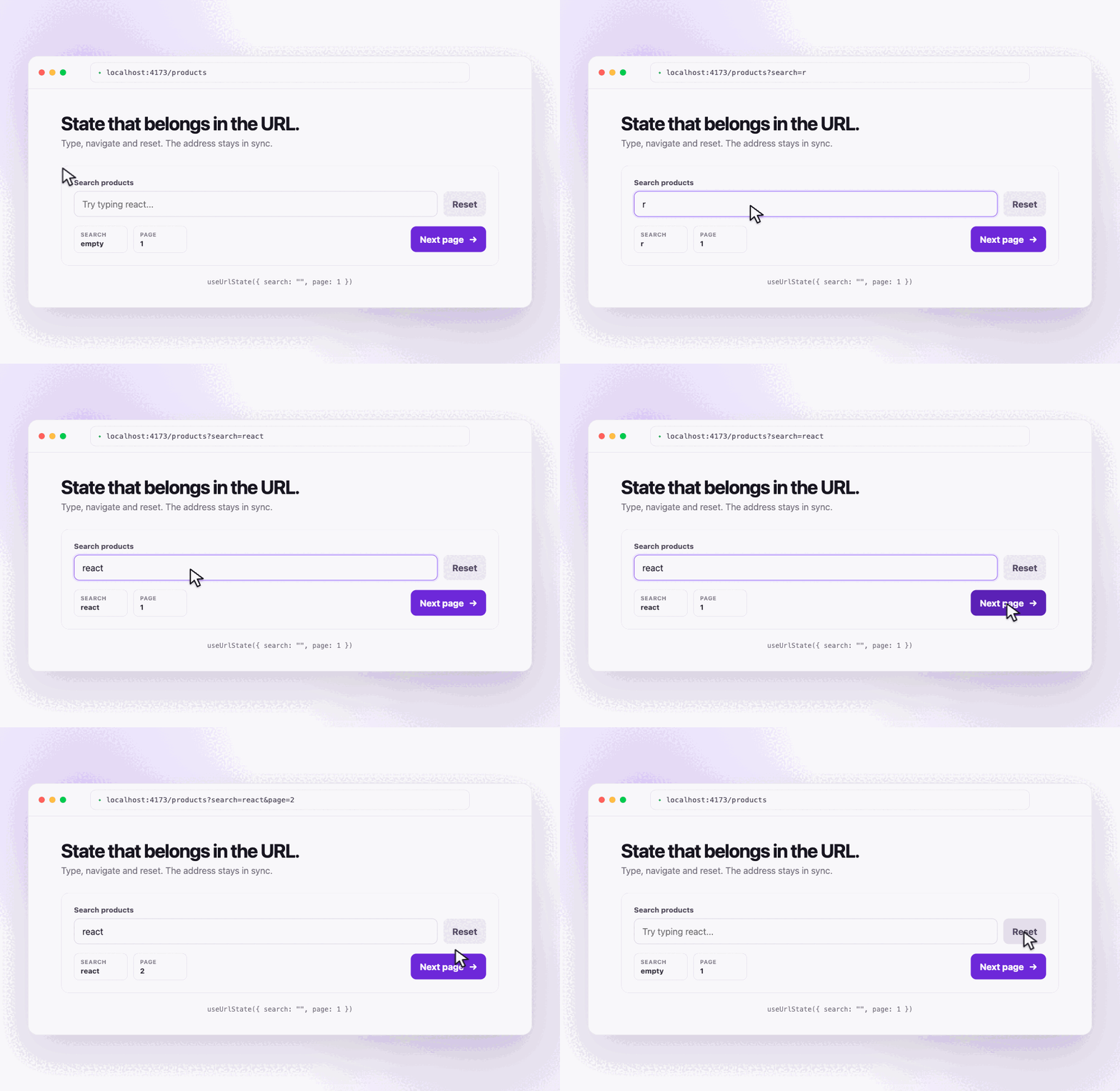
const [page, setPage] = useUrlState("page", 1);

setPage(2);
// ?page=2
The URL is the source of truth. Existing query parameters, the pathname and the hash are preserved.
- One hook for single or grouped query state.
- Types inferred from defaults.
- Typed parsing for strings, string arrays, finite numbers, booleans and literal values.
- Browser Back and Forward synchronization.
replaceStateby default and optionalpushState.- Server-safe parsing for SSR.
- No runtime dependency other than the React peer dependency.
- About 1.3 kB gzip for the client and 0.6 kB gzip for the server parser.
npm install urlstate-jsRequirements:
- React 18 or newer.
- TypeScript 5 or newer for literal inference.
"use client";

import { useUrlState } from "urlstate-js";

const Page = () => {
    const [search, setSearch] = useUrlState("search", "");

    return (
        <div>
            <input
                value={search}
                placeholder="Search..."
                onChange={(event) => setSearch(event.target.value)}
            />

            <button type="button" onClick={() => setSearch(null)}>
                Clear
            </button>
        </div>
    );
};
Opening /?search=react returns "react". Setting null, an empty default, or
the configured default removes the query from the URL.
See simple.tsx for a complete example.
Pass an object to read and update related queries together:
const [filters, setFilters] = useUrlState({
    archived: false,
    page: 1,
    search: "",
});

setFilters({ search: "react", page: 2 });

setFilters((previous) => ({
    page: previous.page + 1,
}));
Updates are atomic and only affect the configured keys. Other query parameters remain untouched.
See advanced.tsx for grouped state, literal values, literal arrays, functional updates, history and reset.
const [search, setSearch] = useUrlState("search", "");A string default accepts any string.
Use an array default to store several string values in one query:
const [tags, setTags] = useUrlState("tags", []);

setTags(["react", "typescript"]);
// ?tags=react,typescript
String arrays use one comma-delimited query value. The comma is reserved as the separator and array items must not contain commas. This constraint is not validated by the library; the application is responsible for its values.
The comma remains readable in the URL. Setting the configured array default removes the query.
const [page, setPage] = useUrlState("page", 1);Only finite numbers are accepted. An invalid value such as ?page=invalid
returns the default.
const [archived, setArchived] = useUrlState("archived", false);The URL accepts true, false, 1 and 0. Values written by the hook use
true and false.
Use { default, values } when a query only accepts a fixed set:
const [theme, setTheme] = useUrlState("theme", {
    default: "light",
    values: ["light", "dark"],
});

setTheme("dark");
// setTheme("custom"); // TypeScript error
The inferred type is "light" | "dark". Missing or invalid values return
"light". Reading an invalid URL does not mutate it; the invalid value is only
ignored by the state.
The same configuration works in a group:
const [settings, setSettings] = useUrlState({
    page: 1,
    theme: {
        default: "light",
        values: ["light", "dark"],
    },
});Use the same { default, values } configuration with an array default to only
accept arrays made from a fixed set of strings:
const [addons, setAddons] = useUrlState("addons", {
    default: ["backup"],
    values: ["backup", "monitoring"],
});

setAddons(["backup", "monitoring"]);
// ?addons=backup,monitoring
// setAddons(["custom"]); // TypeScript error
The inferred type is ("backup" | "monitoring")[]. Every default item must be
included in values. If any item read from the URL is not allowed, the whole
array returns to the configured default. An empty array remains valid and is
stored as ?addons= when the configured default is not empty.
Use a plain array default instead when any string should be accepted:
const [addons, setAddons] = useUrlState("addons", ["custom", "backup"]);Updates use history.replaceState by default. This avoids adding a history
entry for every input change:
setSearch("react");Use push when the Back button should return to the previous value:
setPage(2, { history: "push" });
setFilters({ page: 2 }, { history: "push" });Setting one state to null removes its query:
setSearch(null);Use resetUrlState outside a setter or to reset several keys:
import { resetUrlState } from "urlstate-js";

resetUrlState("search");
resetUrlState(["search", "page"]);
resetUrlState(["search", "page"], { history: "push" });
Only the selected keys are removed. Mounted hooks update immediately and return to their configured defaults.
Use one plain object as the contract shared by the server and client:
// product-query.ts

export const productQuery = {
    archived: false,
    page: 1,
    search: "",
    tags: [] as string[],
    theme: {
        default: "light",
        values: ["light", "dark"],
    },
} as const;
Parse searchParams before fetching data in a Next.js Server Component:
// page.tsx

import { parseUrlState } from "urlstate-js/server";

import { Products } from "./products";
import { productQuery } from "./product-query";

const Page = async ({ searchParams }) => {
    const query = parseUrlState(await searchParams, productQuery);
    const products = await getProducts(query);

    return <Products initialQuery={query} products={products} />;
};

export default Page;
Pass the parsed state through props so the client starts with the same values:
// products.tsx

"use client";

import { useUrlState } from "urlstate-js";

import { productQuery } from "./product-query";

const Products = ({ initialQuery, products }) => {
    const [query, setQuery] = useUrlState(productQuery, {
        initial: initialQuery,
    });

    // ...
};
parseUrlState accepts a query string, URL, URLSearchParams, or a Next.js
searchParams record. Client updates do not automatically rerun server fetches;
that requires a framework navigation or refresh.
useUrlState(key, defaultValue, options?);
useUrlState(defaults, options?);
options.initial supplies the values used during server rendering and
hydration.
The returned setter accepts a value, a partial object, or a functional update.
Its optional { history: "push" | "replace" } argument controls browser
history.
resetUrlState(key, options?);
resetUrlState(keys, options?);
Removes one or more selected queries and notifies mounted hooks.
import { parseUrlState } from "urlstate-js/server";

const state = parseUrlState(input, defaults);
Parses and validates URL input without importing React or browser code.
npm run checkThe check builds the package, lints, typechecks, runs the tests and enforces the client and server gzip budgets.