Receive text, URLs, images, videos, audio, and files shared into an Expo app.
react-native-share-content is an Expo Module alternative to bridge-based packages such as react-native-share-menu. It supports cold starts, warm starts, multiple attachments, a durable pending queue, typed events, and Expo config plugins for Android share intents and an iOS Share Extension.
Note
This package was previously published as expo-share-content. Existing users should remove the old dependency, install react-native-share-content, update imports and the Expo config plugin entry, then run npx expo prebuild --clean. The JavaScript API and native module identifiers are unchanged.
| Android | iOS |
|---|---|
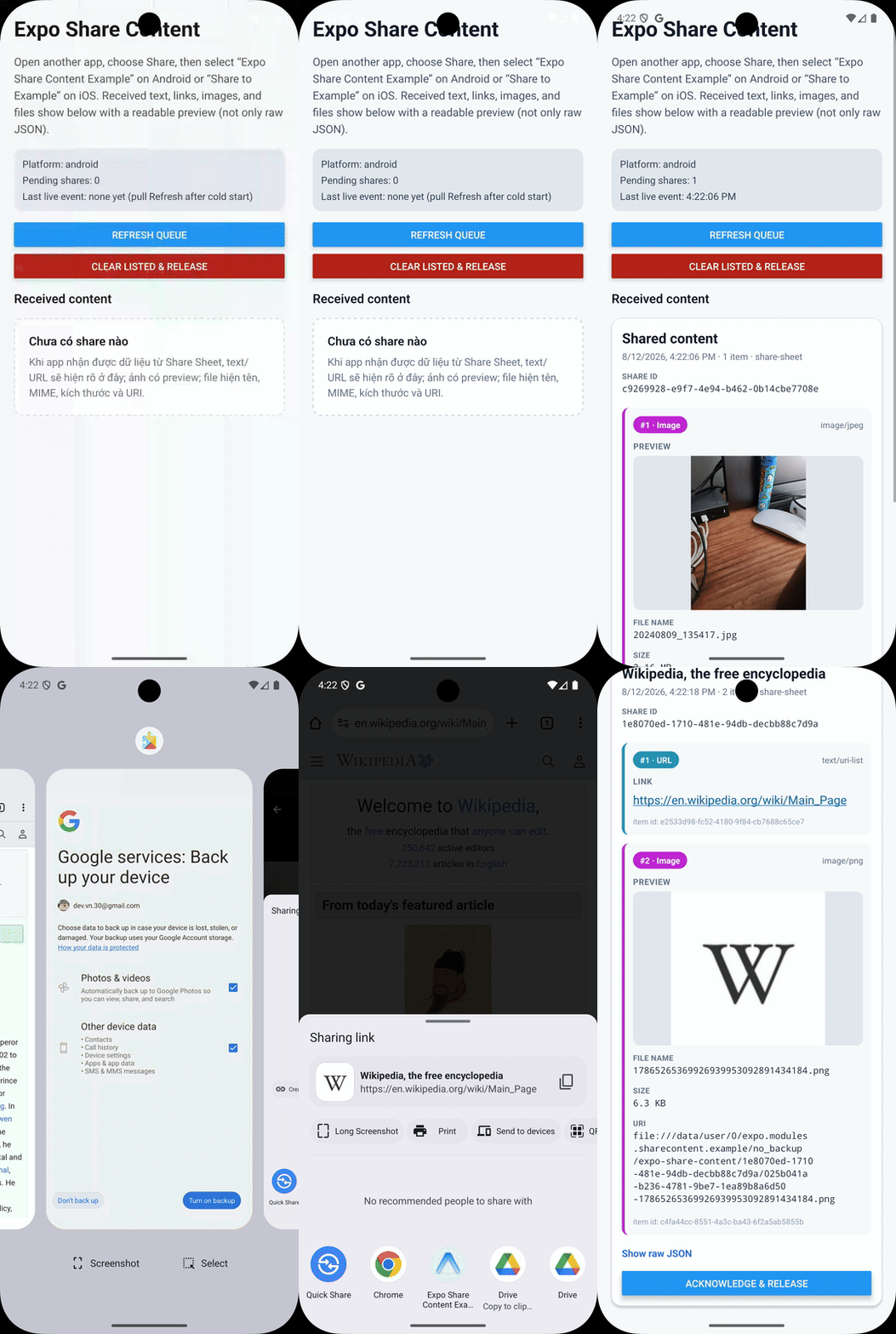 |
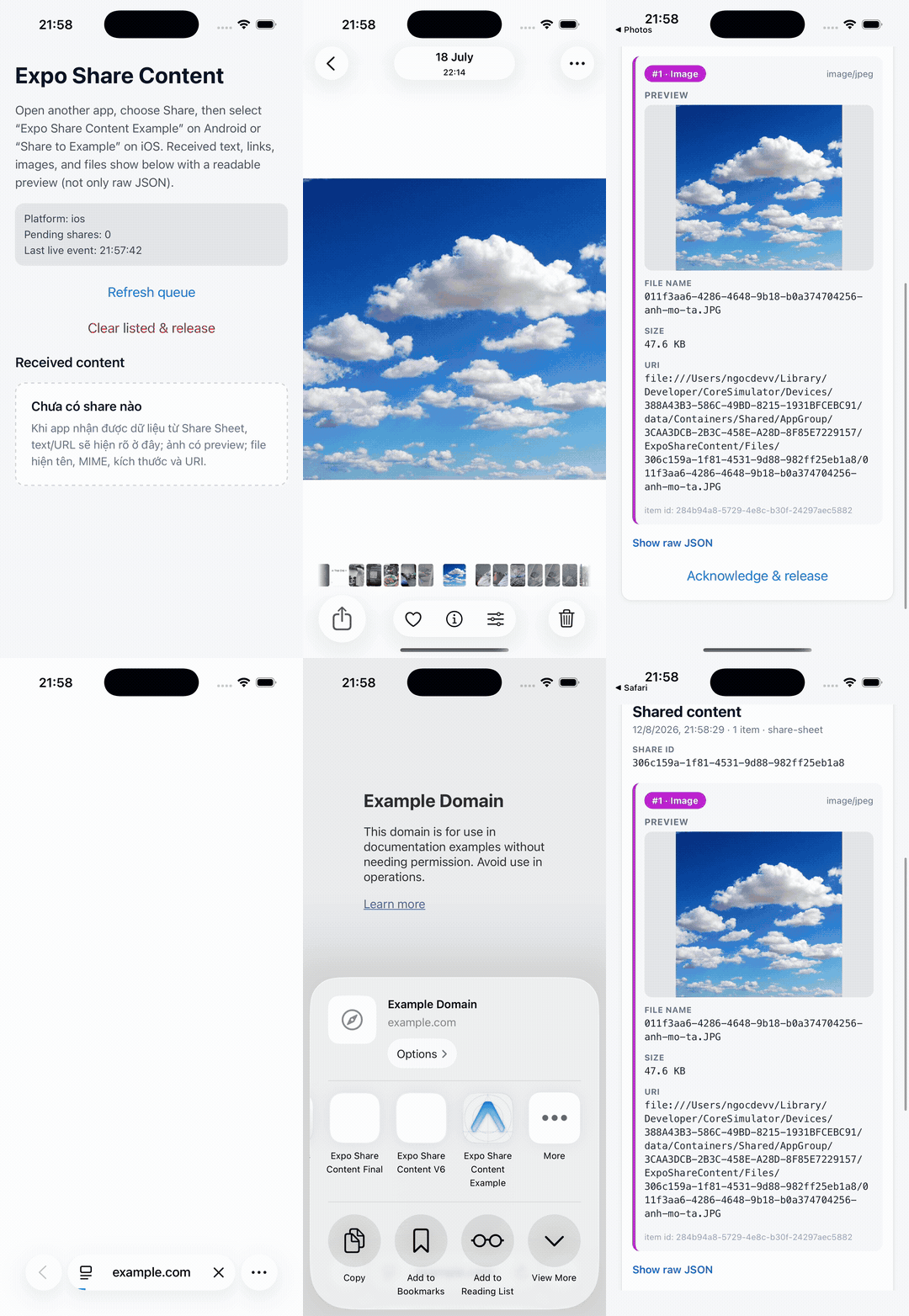 |
Important
This package contains native code and does not work in Expo Go. Use a development build or production build after running prebuild.
| Platform | Receiving support | Native integration |
|---|---|---|
| Android | ACTION_SEND, ACTION_SEND_MULTIPLE |
Intent filters + activity lifecycle listener |
| iOS | Share Extension | App Group queue |
Supported baselines: Expo SDK 57, React Native 0.86, Android API 24+, and iOS 16.4+.
- Android: the config plugin adds share intent filters to the main activity. A lifecycle listener captures the launch intent, while the Expo Module handles new intents. Attachment permissions are temporary, so the module copies incoming
content://data into app-owned no-backup storage before exposing afile://URI. - iOS: the config plugin creates a native-only Share Extension target. The extension streams file representations into a shared App Group container with a byte limit, atomically commits one JSON queue file per share, then completes the extension request. Opening the host app after share is opt-in (
iosOpenHostAppAfterShare) and best-effort only (runtimeUIApplication.open, responder-chainopenURL, thenNSExtensionContext.open) — Apple does not guarantee Share Extensions can foreground the containing app. The host Expo Module reads the queue when the app becomes active; records remain pending until explicit acknowledgement. - JavaScript: pending APIs protect cold-start data from being lost before the JS runtime is ready. Live events make warm-start handling immediate.
Delivery is at least once. A cold-start query and a live event can refer to the same payload; use the stable payload.id to make your handler idempotent. Android does not expose a trustworthy operation identifier for arbitrary ACTION_SEND callers, so a task restored after process death can deliver the same source Intent again under a new payload ID. Prefer duplicate delivery over dropping a separate share that happens to contain identical text or URIs.
npx expo install react-native-share-contentAdd platform identifiers and the config plugin:
{
  "expo": {
    "scheme": "myapp",
    "ios": {
      "bundleIdentifier": "com.example.myapp"
    },
    "android": {
      "package": "com.example.myapp"
    },
    "plugins": [
      [
        "react-native-share-content",
        {
          "iosShareExtensionName": "ShareExtension"
        }
      ]
    ]
  }
}
Tip
On iOS, shares are durable in the App Group queue even if the host app is not opened automatically. Set iosOpenHostAppAfterShare: true plus expo.scheme (or iosHostUrlScheme) only if you want a best-effort attempt to return to your app after sharing. Without it, the user stays in Photos/Safari until they switch apps manually.
Generate and build the native projects:
npx expo prebuild --clean
npx expo run:ios
npx expo run:android
Re-run prebuild and rebuild the development client whenever plugin options change. Starting Metro alone cannot apply native changes.
The plugin is designed for Expo prebuild/Continuous Native Generation. If your repository keeps hand-maintained ios/ or android/ projects, review the generated diff before replacing native files. On iOS, confirm that the new extension bundle ID and App Group are enabled for your Apple team and provisioning profiles.
The plugin adds the iOS app extension metadata used by EAS credentials, including its bundle identifier and App Group entitlement. The defaults are derived from the host bundle ID:
- Extension bundle ID:
<ios.bundleIdentifier>.share - App Group:
group.<ios.bundleIdentifier>
You can override both with plugin options if they already exist in your Apple Developer account.
Register the listener early, then inspect pending shares. Keep processing idempotent because the same ID may arrive through both paths.
import ExpoShareContent, {
  type SharePayload,
} from 'react-native-share-content';
import { useEffect } from 'react';

export function ShareReceiver() {
  useEffect(() => {
    const processedIds = new Set<string>();

    const processShare = async (payload: SharePayload) => {
      if (processedIds.has(payload.id)) return;
      processedIds.add(payload.id);

      try {
        // Persist text or copy file:// items to permanent app storage here.
        await importShare(payload);
        await ExpoShareContent.clearPendingSharesAsync([payload.id]);
        await ExpoShareContent.releaseSharedFilesAsync([payload.id]);
      } catch (error) {
        // Leave the payload pending so it can be retried.
        processedIds.delete(payload.id);
        console.error(error);
      }
    };

    const shareSubscription = ExpoShareContent.addShareListener((payload) => {
      void processShare(payload);
    });
    const errorSubscription = ExpoShareContent.addShareErrorListener(console.error);

    void ExpoShareContent.getPendingSharesAsync().then((payloads) => {
      for (const payload of payloads) void processShare(payload);
    });

    return () => {
      shareSubscription.remove();
      errorSubscription.remove();
    };
  }, []);

  return null;
}
importShare above is application code, not an export from this package.
All share API methods below are available on the default export and as named exports.
dedupeShares and createShareContentApi are named exports only.
Reads all queued payloads without removing them. Results are ordered oldest first. Duplicate IDs inside the native response are removed.
Use this for retryable processing and cold-start recovery.
Returns the oldest pending payload without removing it. This is a convenience wrapper around getPendingSharesAsync().
- Pass IDs to acknowledge only those payloads.
- Omit the argument to clear the whole queue.
Clearing removes the queue record immediately but deliberately does not delete attachment files. Call releaseSharedFilesAsync after copying required files into your own documents/library directory. Unreleased files for acknowledged receipts become eligible for lazy cleanup seven days after receipt when a later queue operation runs; files for still-pending receipts are protected.
Deletes module-managed attachment directories for already-acknowledged receipts. The call rejects if any supplied receipt is still pending, preventing a queue record from pointing at deleted files. This operation is separate from acknowledgement so failed application imports remain retryable.
Subscribes to native share events. Call .remove() on the returned subscription.
Delivery differs slightly by platform: iOS emits pending queue records that have not yet been emitted when observation starts and whenever the app becomes active; Android buffers cold-start intents into the pending queue without emitting them as live events. On both platforms, register the listener early and call getPendingSharesAsync() for cold-start recovery.
Subscribes to errors delivered by the host native module. Android reports intent parsing, file-copy, and queue failures. On iOS, the host reports App Group and queue-read failures; errors that occur inside the separate Share Extension before a queue record is committed are shown in the extension UI and are not forwarded to JavaScript.
Removes repeated payload IDs from a combined array while preserving first-arrival order. For long-lived processing, maintain an application-level set or persisted handled-ID table.
Creates the same JavaScript API around an injected ShareContentNativeModule. This named export is useful for tests and custom native-module adapters; normal applications should use the default export or named API methods.
type SharedContentType =
  | 'text'
  | 'url'
  | 'image'
  | 'video'
  | 'audio'
  | 'file';

type ShareSource = 'share-sheet';

type SharedContentItem = {
  id: string;
  type: SharedContentType;
  mimeType: string | null;
  text?: string;
  uri?: string;
  fileName?: string;
  size?: number;
};

type SharePayload = {
  id: string;
  timestamp: number; // Unix time in milliseconds
  source: ShareSource;
  title?: string;
  items: SharedContentItem[];
};

type ShareErrorEvent = {
  code: string;
  message: string;
};

type ShareSubscription = {
  remove(): void;
};
Advanced consumers can also import ExpoShareContentModuleEvents, the low-level ShareContentNativeModule adapter contract, and ShareContentApi, which is the return type of createShareContentApi.
A single payload represents one share operation, so an Android SEND_MULTIPLE intent or multiple iOS extension attachments stay grouped in items.
- Text and URL items use
text. - Binary items use a local
file://uriand may includefileName,mimeType, andsize. - Managed URIs are isolated from the source app's temporary permission. Pending files are protected.
releaseSharedFilesAsyncdeletes acknowledged receipt directories immediately; acknowledged but unreleased directories become eligible for lazy cleanup seven days after receipt, triggered by later queue operations.
| Option | Default | Description |
|---|---|---|
androidIntentFilters |
text, image, video, audio, application wildcards | MIME types accepted for ACTION_SEND |
androidMultiIntentFilters |
image, video, audio, application wildcards | MIME types accepted for ACTION_SEND_MULTIPLE |
iosActivationRules |
text, URL, up to 10 images/movies/files | Supported iOS activation-rule dictionary or predicate string; only the keys listed below are accepted, and TRUEPREDICATE is rejected for App Store safety |
iosAppGroupIdentifier |
group.<bundleIdentifier> |
Shared container used by app and extension |
iosShareExtensionName |
ShareExtension |
Share-sheet display name; the Xcode/EAS target keeps only ASCII letters and digits and must not be empty |
iosShareExtensionBundleIdentifier |
<bundleIdentifier>.share |
Extension bundle ID; must differ from and start with <ios.bundleIdentifier>. |
iosDeploymentTarget |
16.4 |
Extension deployment target; cannot be below 16.4 |
iosOpenHostAppAfterShare |
false |
Opt-in best-effort open of the host app after a successful share (UIApplication / responder-chain / NSExtensionContext.open). Not guaranteed by Apple |
iosHostUrlScheme |
expo.scheme |
URL scheme used when auto-open is enabled ("myapp" → myapp://share?shareId=…) |
maxSharedItems |
20 |
Maximum item providers handled per share; must be 1...2147483647 |
maxSharedFileSize |
104857600 |
Maximum bytes copied for one attachment (100 MiB); must be 1...2147483647 |
maxSharedTotalSize |
262144000 |
Aggregate binary bytes copied for one share (250 MiB); must be at least maxSharedFileSize and at most 2147483647 |
For dictionary-based iosActivationRules, the plugin accepts only these Apple keys:
- Boolean:
NSExtensionActivationSupportsText. - Positive integer:
NSExtensionActivationSupportsAttachmentsWithMaxCount,NSExtensionActivationSupportsAttachmentsWithMinCount,NSExtensionActivationSupportsFileWithMaxCount,NSExtensionActivationSupportsImageWithMaxCount,NSExtensionActivationSupportsMovieWithMaxCount,NSExtensionActivationSupportsWebPageWithMaxCount, andNSExtensionActivationSupportsWebURLWithMaxCount.
Dictionary rules must contain at least one supported key. Numeric activation-rule values cannot exceed maxSharedItems. Predicate strings must be non-empty and must not contain TRUEPREDICATE.
Example with narrower Android filters and explicit Apple identifiers:
[
  "react-native-share-content",
  {
    "androidIntentFilters": ["text/plain", "image/*"],
    "androidMultiIntentFilters": ["image/*"],
    "iosAppGroupIdentifier": "group.com.example.myapp.shared",
    "iosShareExtensionBundleIdentifier": "com.example.myapp.share",
    "maxSharedItems": 10,
    "maxSharedFileSize": 52428800,
    "maxSharedTotalSize": 157286400
  }
]
The plugin validates MIME syntax, positive limits, identifiers, and deployment targets during prebuild.
- The plugin sets the main activity to
launchMode="singleTask"anddocumentLaunchMode="never"so new shares reach the existing activity throughonNewIntent. Review this if your app intentionally uses another task model. - The plugin preserves user-authored
SENDfilters and only skips structurally identical generated filters. Run a clean prebuild after changing the MIME filter options so obsolete generated filters are removed with the disposable native project. - Only
content://streams that are members of this Intent, carryFLAG_GRANT_READ_URI_PERMISSION, and pass a URI permission check are accepted.file://URIs and ambient already-held permissions without a share grant are rejected. - Receipt IDs use a private nonce for each observed Intent, and caller-supplied private receipt extras are not trusted. The consumed Activity Intent is neutralized to prevent lifecycle replay in the current process. Content equality is deliberately not used as an operation ID: two deliberate shares with identical content are both accepted. Rare process-restoration replay remains possible under the package's at-least-once contract.
- Both
Intent.EXTRA_STREAMandClipDataare supported. Text can accompany attachments. - Incoming files are capped by the configured item-count, per-file byte, and per-share aggregate byte limits. In addition, each platform rejects new attachment copies once all module-managed files (including acknowledged files not yet released) reach 1 GiB.
- A main-app native module alone cannot appear in the iOS share sheet; the generated Share Extension is required.
iosShareExtensionNameremains unchanged as the share-sheet display name, but its Xcode target, directory, product, and EAStargetNamekeep only ASCII letters and digits; the result must not be empty ("Share to Example"becomesSharetoExample).- A custom
iosShareExtensionBundleIdentifiermust be different from the host bundle ID and prefixed by<ios.bundleIdentifier>., as required for an embedded app extension. - Binary/media attachments use
loadFileRepresentationwith 64 KiB streaming. Text/URL values useloadDataRepresentationand are rejected above the 256 KiB text cap before decoding. - By default the extension does not auto-open the host app. Queue delivery is independent of auto-open. If you set
iosOpenHostAppAfterShare: true, the extension attempts a best-effort open chain and awaits it beforecompleteRequest. - App Group and extension provisioning must exist for device/App Store builds. Simulator builds do not prove production signing is configured.
- If you change the bundle ID, App Group, or extension name, run a clean prebuild.
- No Expo Go support.
- No outbound share API; use React Native's
ShareAPI or another package to send content out of the app. - No background upload or permanent file management.
- iOS host auto-open is opt-in and best-effort only; Apple does not guarantee Share Extensions can foreground the containing app.
- Text is capped at 256 KiB, each platform accepts at most 20 pending receipts, and all module-managed attachment files are capped at 1 GiB. Process/clear pending shares and call
releaseSharedFilesAsyncafter importing attachments. - End-to-end share-sheet behavior must still be tested on physical Android and iOS devices because source apps expose different MIME/UTType combinations.
npm install
npm test
npm run lint
npm run build:all
npm run verify:cjs
The example/ app links the package through file:... Its generated ios/ and android/ directories are disposable prebuild output.
npm test covers the JavaScript wrapper, config plugin, and the example app's queue-state regression helper. Native queue-codec tests live under android/src/test/ and ios/Tests/; run them through the generated example Android project or compile the Swift test harness when changing native queue behavior.
MIT